Import stats from Google Analytics
Plausible Analytics allows you to import your historical stats from Google Analytics 4 (GA4). You can import multiple Google Analytics properties into the same Plausible dashboard without having any gaps in the data and without any double-counting. You can also segment the imported data and export it using our regular exporting methods (CSV and stats API).
Here's how you can import your historical Google Analytics stats into your Plausible dashboard.
Migrating from Google Analytics? Bring your historical data with you
How to import your historical stats from Google Analytics to Plausible Analytics
-
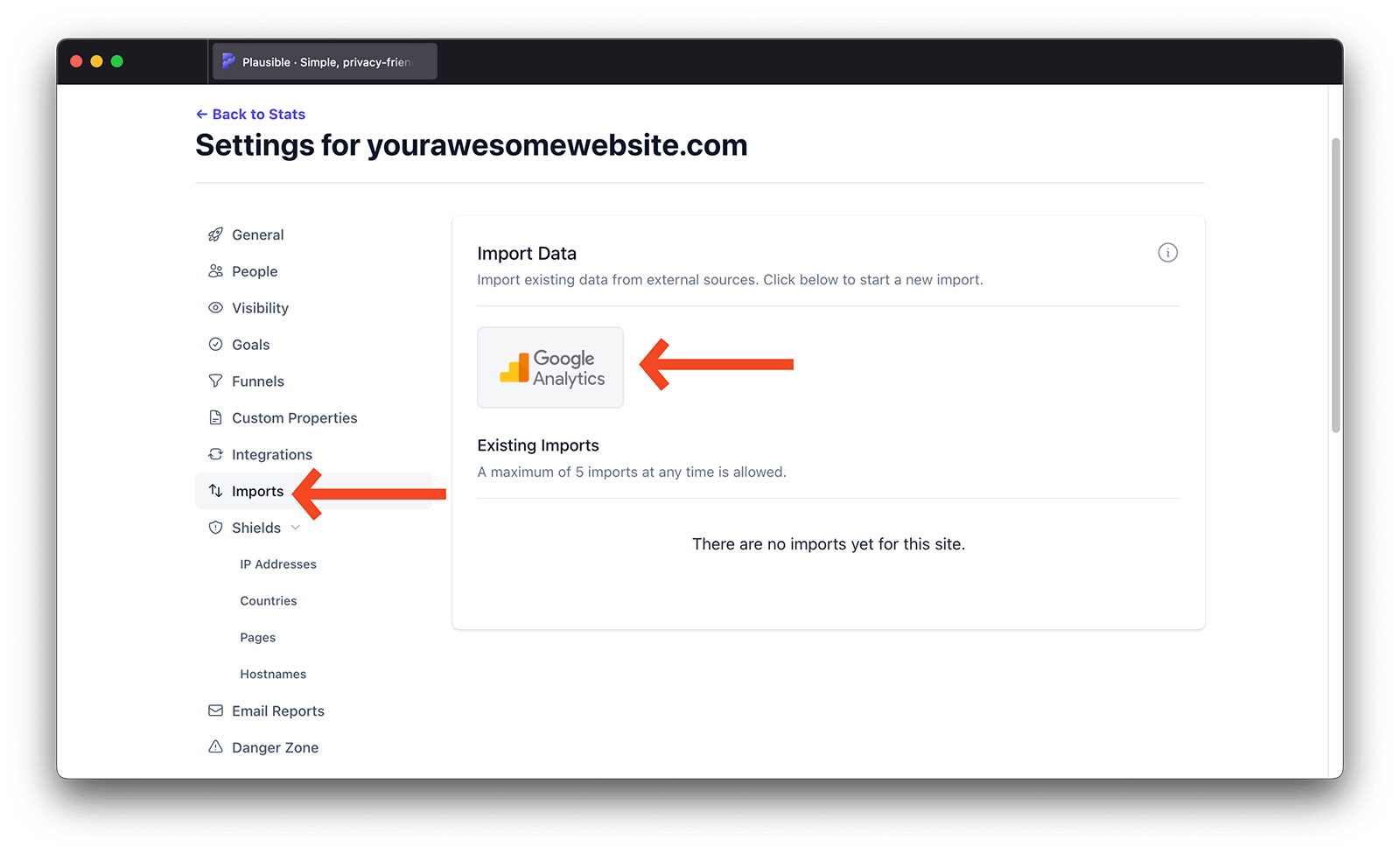
Go to the Plausible Analytics site settings for the website you'd like to import the data for.
-
In the Imports & Exports section, find the Import Data panel. You can link your Google account to your Plausible account by clicking on the Google Analytics button.
-
After linking Plausible to your Google account, you'll see a drop-down selection menu listing all the existing Google Analytics properties associated with the connected Google account. Select the property that you'd like to import and click on the Continue button.
-
On the next screen, you can click on the Confirm import button to start the data import process. The import should take no more than a few minutes for most sites but if you have a site with a lot of historical data, it may take up to a couple of hours to complete due to Google's API limits. You'll receive an email when the import has been completed.
-
Once you have received the email, the imported data will be visible in your Plausible dashboard alongside the native data. You can turn this off by opening the options menu (the ⋮ icon in the top right of the chart) and toggling off Include imported data.
Import multiple Google Analytics properties into the same Plausible dashboard
If you'd like to import multiple Google Analytics properties into the same Plausible dashboard, please go through the process above again and choose a different property to import. You can import a maximum of 5 different properties into the same Plausible dashboard.
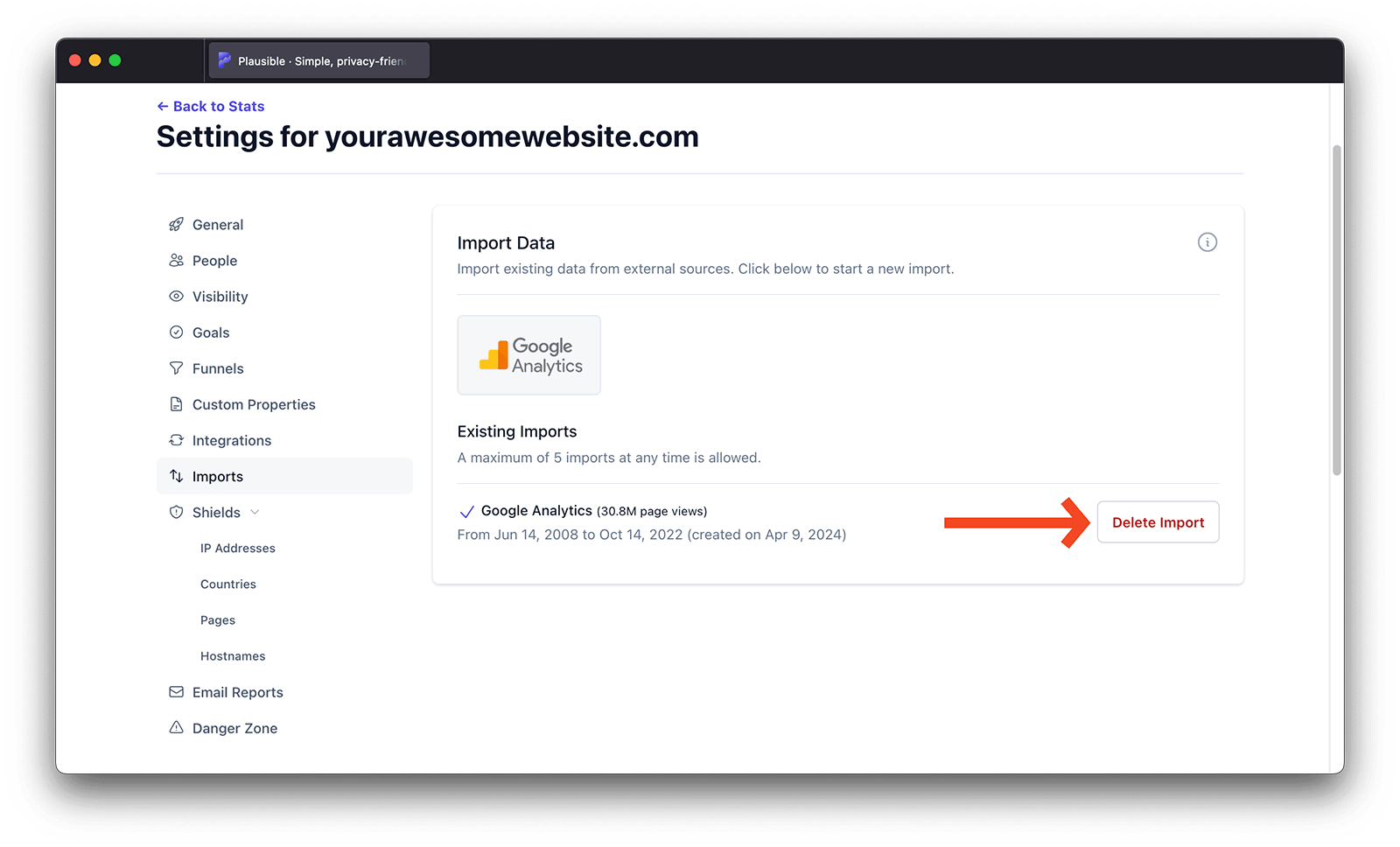
In the Imports & Exports section, you can see the overview of all your existing imports to that specific Plausible dashboard. For each import, we list the Google Analytics property ID, the number of pageviews imported and the time range that the import covers.
How much data is imported?
Data is imported in aggregate for each date, from your first Google Analytics visitor until your first Plausible Analytics visitor. This is to avoid double-counting visits.
We also have measures in place to detect and avoid double-counting visitors if you import multiple GA properties into the same Plausible dashboard. Here's an example of how it works:
- Say that you started counting visitors with Plausible for your site on March 11th 2024
- You do the first Google Analytics import into that Plausible dashboard and choose your oldest GA property. We automatically import the data from when you started using that GA property until you stopped using it (say Oct 25th 2008 to May 19th 2023)
- Then you do the second Google Analytics import into that Plausible dashboard and this time you choose your newer GA property. We automatically import the data from when you stopped using the first GA property until you started using Plausible (May 19th 2023 to Mar 11th 2024)
This makes it easy and convenient to import all your historical Google Analytics stats from multiple properties without having any gaps in your data and without any double-counting. It also allows you the flexibility to choose the order in which you import your historical properties into Plausible. For instance, if you've used different GA properties simultaneously for some time, you can choose which data you prefer to keep in Plausible and import that specific property first. The second import will cover the missing date ranges and will not overwrite the first import.
This isn't recommended as the native data is superior to the imported data but it's possible if you wish to do so. You can reset the Plausible stats first and make the import after that
Google Analytics Data Retention limits
How long time frame we can import the data for also depends on the data retention limits in Google Analytics. If there are no data retention limits in your Google Analytics account, we can import all the data.
If you have strict data retention limits in place in Google Analytics (for instance GA4 properties have data retention limit of up to 14 months), we can only show the metrics in the top chart of your Plausible dashboard for periods outside of your data retention limit as Google automatically deletes all the other stats. Note that how much data you can import may also depend on your Plausible subscription plan.
How do I delete the imported data?
Data you have imported can be deleted by returning to your site's Imports & Exports settings page and clicking the bin icon in the Imports section. This action won't affect the native data you have collected using our script directly.
Can I delete my Google Analytics account after a successful import?
We no longer need access to your Google Analytics account after the import has been completed successfully. If you're happy with the way your Google Analytics stats look in your Plausible Analytics dashboard, you can safely delete your Google Analytics account. Your imported data will stay in your Plausible account.
How does imported data differ from Plausible native data?
We have taken many steps to make the imported data feel as fast, easy, and straightforward as the native data collected by Plausible directly. But it's important to note that imported data won't be as flexible as the native data that we collect using our script. Here are the differences:
Filtering
Simple filtering of imported data is possible but we're unable to look at how some metrics interact with each other which makes the more advanced segmenting limited. Whenever imported data cannot be included due to the applied filters, you will see a warning bubble stating “Imported data is excluded due to applied filters” in the corresponding report.
Unique visitors
When you're looking at a longer period of time, you may see a discrepancy in the number of total unique visitors in your data in Google Analytics and in the Google Analytics data you imported to Plausible. This happens because we only import day-level aggregated data.
To get the number of unique visitors in a longer period of time (say one month) we just sum up the daily unique visitor numbers. We can't do the proper unique visitors calculation like Google Analytics is doing.
UTM sources
Google Analytics aggregates UTM source under the source dimension and they don't expose a separate UTM source dimension from their API. This is why we cannot show UTM sources imported from Google Analytics.
Goals
It's possible to import your goal conversion data from Google Analytics 4. When your import finishes, you will not see your goal data show up automatically. You need to go to your site settings and add the goals you want to show up on your dashboard. Note that ecommerce revenue numbers cannot be imported.
Browser versions
We can import your traffic split between the different browsers but you can't drill down to see the imported data's exact browser versions.
Exit pages
Google Analytics API does not expose this information so you cannot see the Exit Pages tab for imported data.
Scroll Depth
Google Analytics API does not expose this information so you cannot see the scroll depth metric for imported data.
Day view graph
We can't display hourly graph interval on the daily view.
Consolidated view
Imported data is not included in the consolidated view dashboard. The consolidated view only reflects data collected natively by Plausible.
Before you import: migration planning
Do you need to import at all?
If you are starting fresh with Plausible and do not need to reference historical trends, you can skip the import entirely. Plausible will start building its own clean dataset from day one.
Import is most useful when you need to compare current performance against a historical baseline, report on year-over-year trends or fill in data for a period before you installed Plausible.
Running GA and Plausible in parallel
Install Plausible alongside your existing Google Analytics setup. Run both for at least 2-4 weeks before removing GA. This lets you verify that Plausible is tracking correctly and gives you a period of overlap to compare the two datasets. Do not import data that overlaps with your Plausible native data. The import tool handles date ranges to avoid double-counting, but the metrics from the two sources are calculated differently and will not match exactly.
GA4 data retention limits
GA4 has a default data retention limit of 2 months for event-level data (14 months on paid plans). If you want to import historical data, do it before that retention window closes. Once GA deletes the data, it cannot be recovered. Check your GA4 property settings under Data Settings → Data Retention to see how much history is available.
Mapping GA goals to Plausible goals
GA4 custom events and conversions do not import directly as Plausible goals. After importing, you will need to recreate your goals in Plausible. Make a list of your key GA4 conversion events before you start, then set up equivalent custom event goals or pageview goals in Plausible.
What to expect from imported data
Imported GA4 data and native Plausible data use different counting methods. The numbers will not match, even for the same time period. This is expected.
Unique visitors
Plausible counts unique visitors using a daily hash of IP address and User-Agent. GA4 uses device-based identifiers and cookies. Imported data calculates unique visitors by summing daily uniques, which can overcount visitors who return across multiple days. For periods measured in weeks or months, this difference can be significant. See the metrics definitions page for how Plausible defines each metric.
Sessions and bounce rate
GA4 defines sessions and engagement differently from Plausible. GA4 uses an "engaged session" model; Plausible uses a simpler session model with a 30-minute inactivity timeout. Bounce rates from imported data will likely differ from what Plausible records natively.
Traffic sources
Imported data maps GA4 sources to Plausible's source fields where possible, but some source attribution will be less granular than what Plausible captures natively. UTM parameters are imported but some GA4-specific channel groupings have no direct equivalent.
What imported data does not support
As noted in the import steps above, imported data does not appear in consolidated views, does not support advanced filtering by custom properties and does not include scroll depth, exit pages or hourly breakdown. Treat imported data as a rough historical reference, not a like-for-like comparison with native Plausible data.
Troubleshooting data discrepancies
Numbers are much lower in Plausible than in GA4
GA4 uses modeled data and consent mode to estimate traffic for users who declined cookies. Plausible does not use modeled data. If you had consent mode enabled in GA4, GA4 will show higher numbers for users who rejected tracking. Plausible only counts real visits it received.
Numbers are higher in Plausible than in GA4
Plausible does not require cookie consent and is blocked far less often than Google Analytics by browser-level tracking protection. GA4 is blocked by Safari ITP, Firefox Enhanced Tracking Protection and many ad blockers. Plausible natively captures more traffic, particularly from privacy-conscious users.
Import appears to complete but data is missing
Check the date range of your import in your Plausible site settings. If your GA4 property had a data retention limit, some older data may have already been deleted by Google before the import ran. If the import failed partway through, delete the import and start again.
Imported data and native data show a gap or overlap
The import tool sets the end date of the import to one day before your first Plausible native data point. If you see a gap, check that Plausible was correctly installed and recording data before you ran the import. If you see overlap, delete the import and re-run it after confirming your Plausible installation date.
What's next?
- Set up goals in Plausible to replace the GA4 conversions you were tracking. Imported goal data will appear once you recreate matching goals in your site settings
- Compare date ranges that span your imported history and your native Plausible data together
- Filter and segment your imported data by source, page or country to reproduce the key reports you used in GA4
- Export to CSV or use the Stats API for reporting outside the dashboard